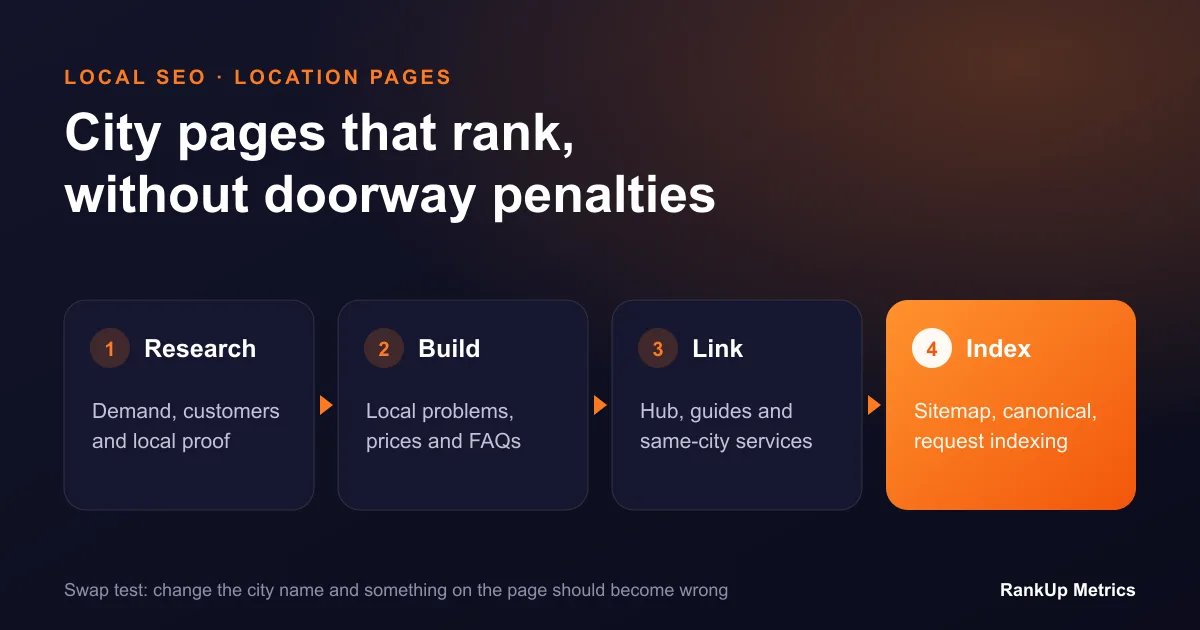
A location page is one of the most valuable pages a service business can publish. Someone searching "SEO agency in Manchester" or "web design company Chicago" has already decided what they want and where. If your page answers that search well, the enquiry that follows is usually high quality.
It is also one of the most abused page types on the web. Thousands of sites publish fifty near-identical city pages, swap the town name and hope Google ranks them. Most of those pages sit in Search Console as "Discovered" or "Crawled" and are never indexed. Some drag down how Google sees the whole site.
This guide explains how to do location pages SEO properly: how Google treats city pages, how to decide which locations deserve one, what a page that ranks actually contains, how to link it into your site, and how to get it indexed. The examples come from the work we do on our own London, Manchester and New York pages and on client sites.
What a Location Page Is, and What It Is Not
A location page targets people looking for a specific service in a specific place. It usually combines a service ("SEO services", "web development", "AI automation") with a city, region or country.
A good location page answers three questions better than any other page on your site:
- Can you help someone in this place? Coverage, time zone, language, travel or remote delivery.
- Do you understand this market? Local competition, regulation, customer behaviour and industries.
- What should I do next? Prices, timelines, proof and a clear way to get in touch.
A location page is not a copy of your service page with a city name added to the title, H1 and first paragraph. It is not a list of fifty suburbs in the footer, and it is not a page for a town you have never worked in and cannot describe.
Doorway Pages: Where Google Draws the Line
Google's spam policies describe doorway pages as pages created to rank for similar searches that lead people to pages which are not useful. One of the examples Google gives is having many pages that target specific cities or regions and funnel users to one page.
That does not mean city pages are risky in themselves. It means the page has to be useful on its own. The simplest way to see the difference is to compare the two side by side.
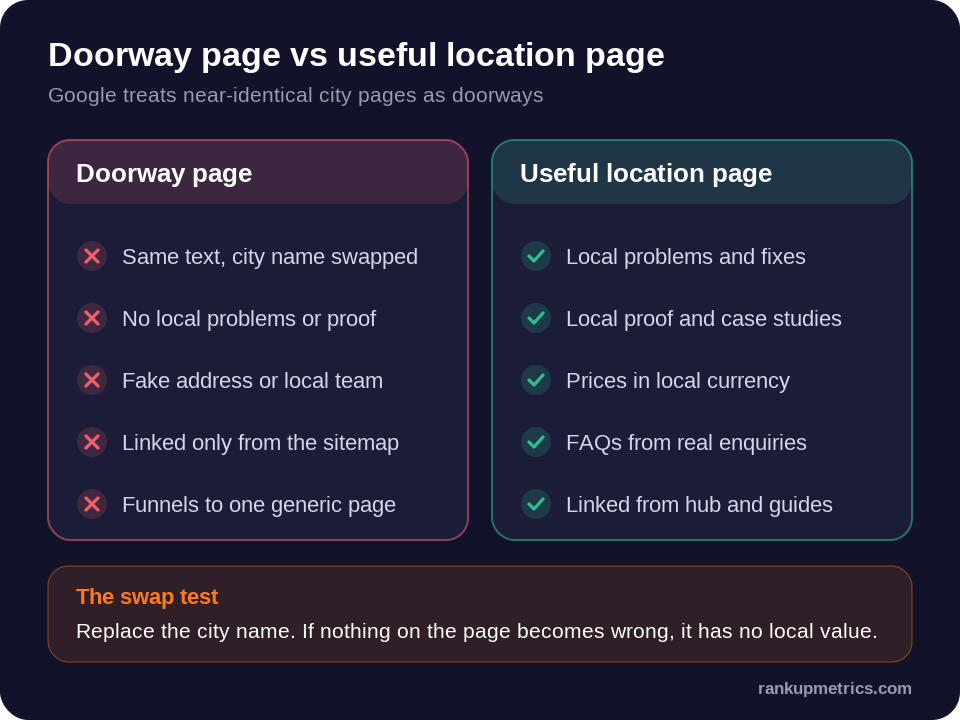
A quick test we use is the swap test: replace the city name on the page with another city. If nothing else on the page becomes wrong, the page has no local value. On our Edinburgh SEO page, swapping "Edinburgh" for "Leeds" would make the sections on festival-season demand and the Scottish Home Report wrong immediately. That is the kind of content that passes.
How Google Ranks Local Results
Google's own explanation of how local results are ranked names three main factors: relevance, distance and prominence. They apply most directly to the map pack and Google Business Profile, but the same ideas shape which organic page Google shows for a "service + city" search.
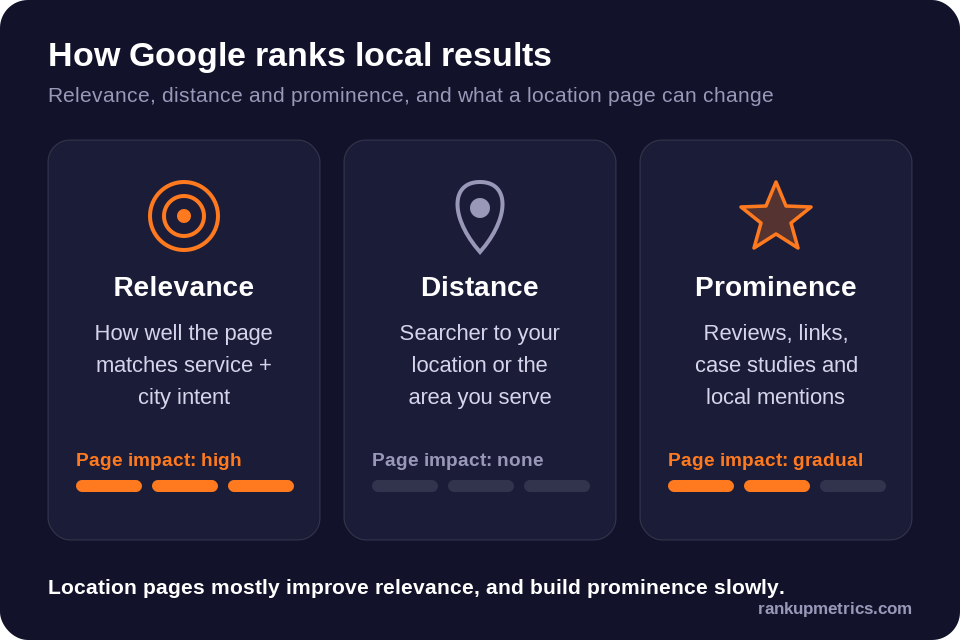
- Relevance is how well the page matches what the person searched. A page that clearly explains the service, the local market and the problems people in that city face is more relevant than one that only mentions the city name.
- Distance is how far the searcher is from your location, or from the area you serve. A page cannot change distance, which is why remote-first agencies tend to rank better in organic results than in the map pack.
- Prominence is how well known and trusted you are: reviews, links, mentions, case studies and how strong your site is overall. Location pages build prominence slowly through local proof and links from local sources.
If you serve customers at their premises or remotely rather than from an office in each city, read our guide to local SEO for service-area businesses before creating any location pages. It covers how to represent coverage honestly in your Google Business Profile.
Which Locations Deserve a Page?
The biggest mistake is starting with a list of cities. Start with evidence. A location deserves its own page when you can say something specific and true about it, and when there is demand.
| Signal | Create a page | Do not create a page yet |
|---|---|---|
| Search demand | People search for your service with this city name | Almost no searches, or only for your brand |
| Customers | You have clients, enquiries or projects there | You hope to win your first one |
| Local knowledge | You can describe local competition, rules or buyers | You would have to invent local details |
| Proof | Case studies, reviews or named work in the area | No local proof at all |
| Delivery | You really serve it, in person or remotely, in its time zone and language | You would struggle to deliver well |
If a city only meets one or two of these, cover it in a regional page or in your main service page instead. Three strong pages beat thirty thin ones, because thin pages use up crawl attention and send Google a signal that the site produces low-value pages.
Anatomy of a City Page That Ranks
Every location page is different, but the strong ones share a structure. The order below matches how a buyer reads: confirm you can help, check you understand them, look for proof, then act.
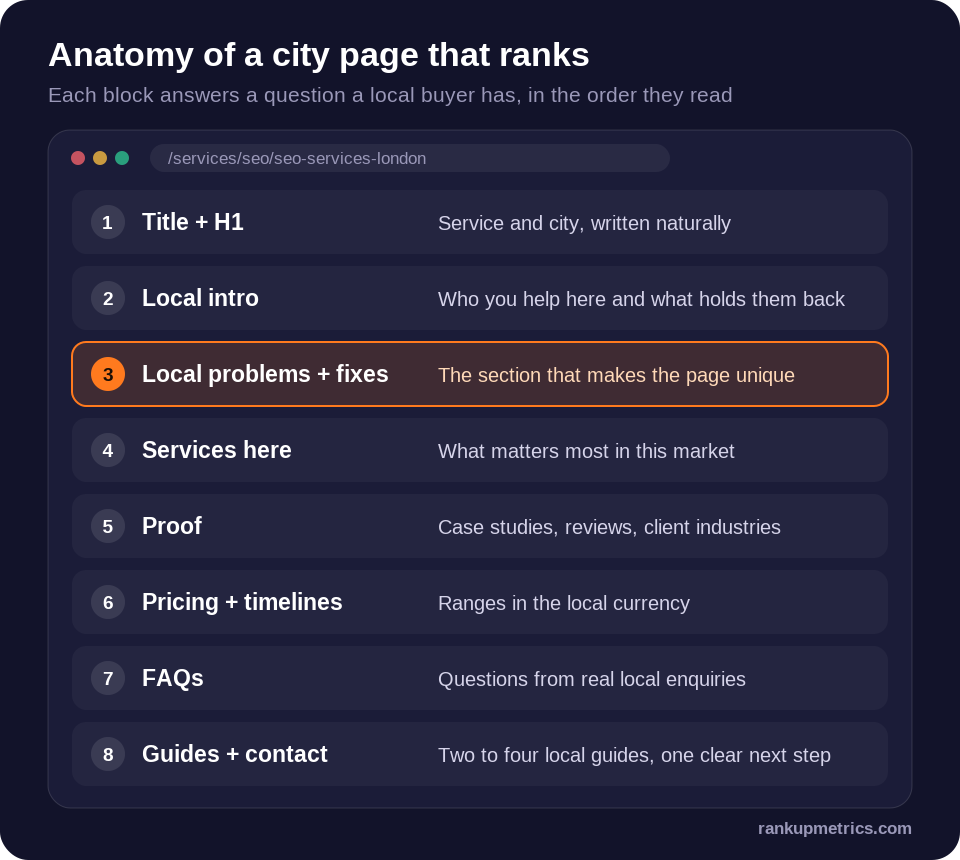
1. A specific title and H1. Use the main search phrase naturally, such as "SEO Services in London" or "Web Design and Development in Chicago". Keep the title readable. Do not stack three city names and four service variations into it.
2. An introduction written for that market. Two or three sentences on who you help in this city and what usually holds them back. Avoid generic lines such as "We are a leading agency serving businesses in [city]".
3. Local problems and how you fix them. This is the section that makes a page genuinely unique. On our Chicago web development page it covers distributor ordering portals, ADA accessibility and Illinois' biometric privacy law. On our Los Angeles web development page it covers California privacy law and Spanish-speaking customers. Those details come from real projects and enquiries, not from a template.
4. Services, as they apply locally. Link to your main service page for the full detail. On the city page, explain which parts matter most here and why.
5. Proof. Case studies, results, reviews and client industries from the area or a similar market. If you do not have local proof yet, use relevant proof from a comparable market and say so honestly.
6. Pricing and timelines. Buyers want a range. UK readers, for example, should see prices in pounds. Our UK SEO pricing guide explains how we present monthly retainers in GBP, and the pricing page holds the current figures.
7. FAQs from real conversations. Use the questions your sales team actually hears in that market: contract length, meeting in person, local regulation, language, payment in local currency.
8. Related guides and a clear call to action. Link to two to four useful guides for this market and end with a simple next step through your contact page.
How to Write Unique Local Content Without Making Things Up
"Unique content" does not mean rewording the same paragraph forty times. It means information a reader in that city cannot get from your other pages. Good sources include:
- Sales calls and enquiry forms. What do prospects in this city ask about first? What objections come up?
- Projects you have delivered. Industries, platforms, integrations and the problems you solved.
- Local rules and market conditions. Licensing, privacy law, accessibility rules, language, seasonal demand.
- The search results themselves. Search your service and city. Note who ranks, what they offer, and what is missing.
- Search Console data. Queries that already bring impressions for the city often show which questions to answer.
Two rules keep this honest. First, only describe what you know to be true; if you are not sure about a regulation, link to the official source rather than paraphrasing it. Second, do not claim an office, address or team that does not exist in that city. Being clear that you serve a city remotely, from a named base, builds more trust than vague wording that customers later find misleading.
For bilingual markets, write the local content in the language customers search in, not as a direct translation. Our guides to Arabic SEO in the UAE and bilingual SEO in Miami cover how to structure language versions with correct hreflang.
Site Architecture and Internal Linking for Location Pages
Location pages are often orphaned: they exist in the sitemap but nothing important links to them. Google discovers them, gives them a low priority and may never crawl them. Internal links tell Google that a page matters and what it is about.
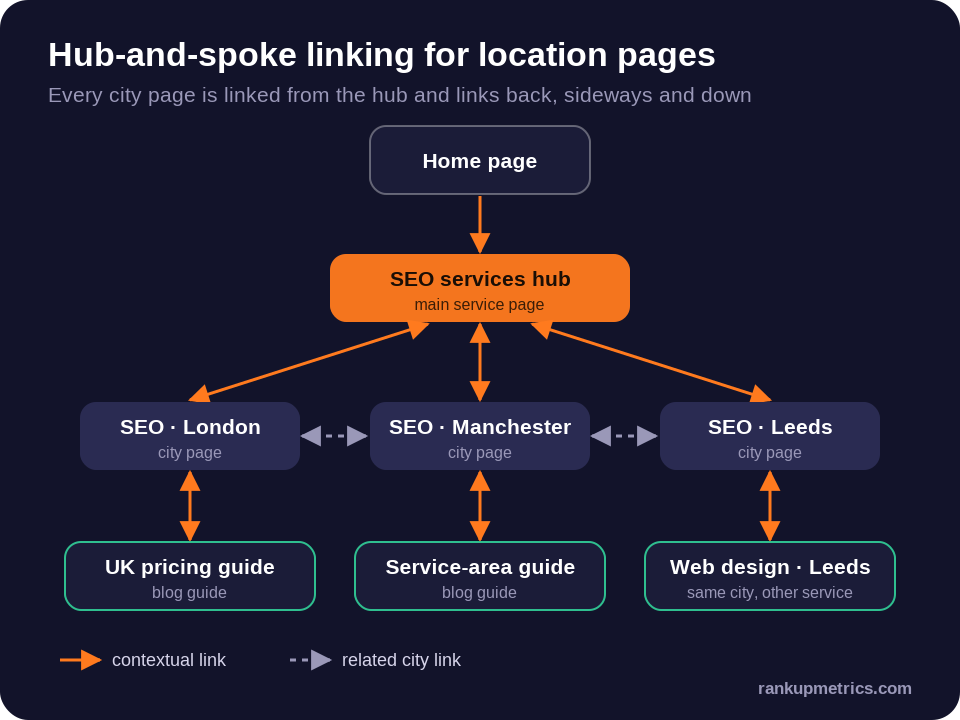
A structure that works well for most service businesses:
- Service hub to city pages. Your main service page, for example our SEO services page, links to each city page with descriptive anchor text such as "SEO services in Birmingham", not "click here".
- City page to service hub. Each city page links back to the main service page for full details, which keeps the cluster tight.
- Same city, other services. Our Leeds SEO page links to web design and development in Leeds, because a business that needs one often needs the other.
- City page to local guides. Link to articles that help readers in that market, such as our Glasgow local SEO guide from the Glasgow SEO page, or the Sharjah SEO guide from the Sharjah SEO page.
- Guides back to city pages. When a blog post mentions a city or market, link to the relevant location page in the body text, where it helps the reader.
- Nearby or similar cities. A small "other locations" block helps discovery, but keep it relevant: UK cities link to UK cities, Gulf cities to Gulf cities.
- Breadcrumbs. Home › Services › SEO › London gives both users and Google a clear hierarchy.
Avoid the opposite mistake as well: a footer with a hundred city links on every page adds little and dilutes the signal. Links work best in context, inside content that explains why the reader might want that page.
URLs, Slugs and When to Change Them
A clean, descriptive URL helps users understand the page before they click. For location pages, a pattern such as /services/seo/seo-services-london or /services/web-development/web-design-development-chicago puts the service and place in a readable order.
Changing an existing URL is a bigger decision than choosing a new one. If a page already ranks and earns links, keep its URL. If a page has never been indexed and you are rebuilding it with new content, a new keyword-led slug is reasonable, provided you:
- 301-redirect the old URL to the new one, one to one, never to the home page;
- update every internal link, including blog posts, menus and footers, so they point straight to the new URL;
- update the XML sitemap so it lists only the new URLs;
- set the canonical tag on the new page to itself;
- request indexing for the new URL in Search Console and watch the old one drop out.
We followed exactly this process when we moved seventeen of our own location pages to new slugs. Our website redesign SEO migration checklist covers the same steps for larger moves.
Schema Markup for Location Pages
Structured data does not make a weak page rank, but it helps Google understand who you are and where you work.
- Organization or ProfessionalService describing your business, with
areaServedlisting the city or region the page targets. - LocalBusiness with an address only where you genuinely have a staffed location customers can visit. Do not create fake addresses for cities you serve remotely.
- BreadcrumbList matching the visible breadcrumb.
- FAQPage for the visible FAQs. Google no longer shows FAQ rich results for most sites, but the markup still describes the content clearly, and the questions themselves help with AI answers.
{
  "@context": "https://schema.org",
  "@type": "ProfessionalService",
  "name": "RankUp Metrics",
  "url": "https://www.rankupmetrics.com/services/seo/seo-services-london",
  "areaServed": { "@type": "City", "name": "London" },
  "serviceType": "SEO services"
}
Keep schema consistent with what the page says. If the markup claims something the visible page does not, it is more likely to be ignored than rewarded.
Getting Location Pages Indexed
Publishing a page is only the first step. Google has to discover it, decide to crawl it, decide it is worth indexing, and then decide where to rank it. Location pages fail at each of these stages for different reasons.
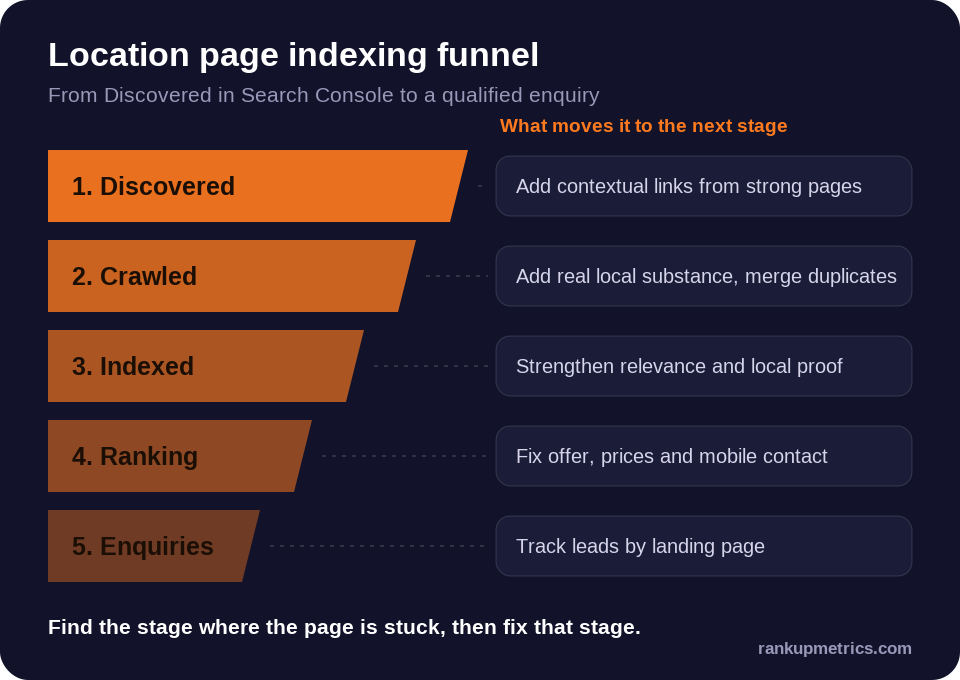
Discovered – currently not indexed. Google knows the URL but has not crawled it. This usually means weak internal links, many similar URLs or a site Google does not yet consider worth crawling heavily. Add contextual links from strong pages and reduce thin pages. Our Discovered – currently not indexed fix service covers this in depth.
Crawled – currently not indexed. Google fetched the page and decided not to index it, often because it looked too similar to other pages or added too little. Rewrite with local substance, merge near-duplicates and make sure the page has a clear purpose. See our Crawled – currently not indexed fix service.
Indexed but not ranking. The page is in the index but does not appear for the city search. Usually it needs stronger relevance (better local content and on-page targeting) or more prominence (reviews, local links, case studies).
Ranking but no enquiries. The page brings visits but no leads. Check the offer, prices, proof and how easy it is to contact you on mobile.
Our guide to Crawled vs Discovered – currently not indexed explains how to read these statuses in Search Console and what each one means.
Measuring Location Page Performance
Judge location pages by enquiries, not just rankings. In Search Console, filter the Performance report by page to see the queries and clicks each city page earns, and check for queries that contain the city name. In your analytics or CRM, record which landing page each enquiry started on.
A simple monthly view per city page is enough:
- impressions and clicks for queries containing the city;
- average position for the two or three most important phrases;
- enquiries, calls and booked meetings that started on the page;
- the share of those enquiries that became qualified opportunities.
If you need this reporting automated across many pages, our guide to custom SEO reporting with the Search Console and GA4 APIs shows how to build it.
Common Location Page Mistakes
- Same content, different city. The single most common reason city pages are not indexed.
- Pages for places you do not serve. Readers notice, and so do quality reviewers.
- Fake addresses or invented teams. They break Google Business Profile guidelines and damage trust.
- No internal links. A page linked only from the sitemap is easy for Google to ignore.
- Keyword-stuffed titles and headings. "Best SEO Company London SEO Agency London SEO Services" reads as spam.
- No local proof or prices. Buyers leave to find a provider who seems to understand their market.
- Changing URLs without redirects. Any value the old page earned is lost, and visitors hit errors.
- Ignoring page speed on mobile. Many local searches happen on phones. Our Core Web Vitals guide covers the main fixes.
Location Page Checklist
Before you publish, or when you review an existing city page, check that:
- there is real demand and you genuinely serve this location;
- the page passes the swap test, with local problems, examples and FAQs that would be wrong for another city;
- the title, H1 and URL describe the service and place clearly;
- prices, timelines and proof are relevant to this market;
- the service hub links to the page, and the page links back;
- at least two relevant guides and one related service page are linked from the body;
- schema matches the visible content and does not invent an address;
- the page is in the XML sitemap, self-canonical and indexable;
- indexing has been requested in Search Console;
- enquiries from the page are tracked to the landing page.
Next Steps
Strong location pages take more work than templates, but they are the pages that win local enquiries and keep winning them. If your city pages are stuck in "Discovered" or "Crawled", or rank without bringing leads, our SEO services team can audit them, rebuild the local content and fix the internal linking. You can see the approach on our location pages for Birmingham, Liverpool, Austin, Chicago, Dubai and London web design and development. Compare plans on our pricing page, or contact us for a review of your current city pages.