
Probably normal if…
Your site is new, you published many pages at once, or the URLs are tags, filters, parameters or old attachment pages.
WordPress crawl and indexing
Google knows your pages exist, but it has not even visited them. We find why Google keeps postponing your URLs and fix the server, crawl and internal linking problems behind it.
Packages start from $20
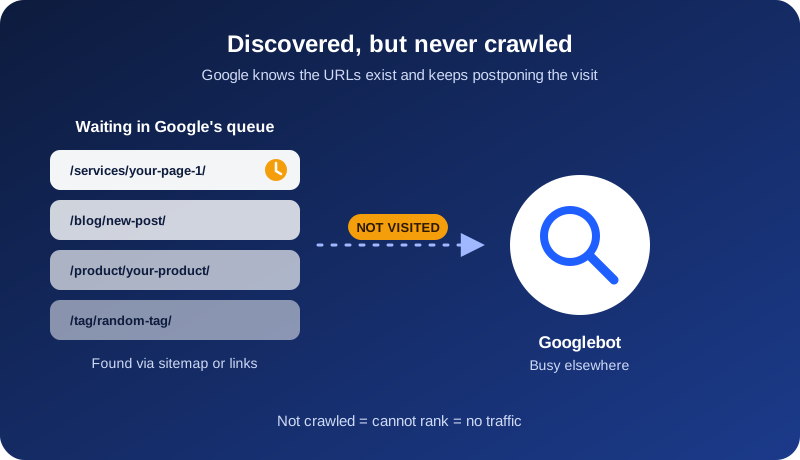
The Search Console status
Google has found the URL, usually through your sitemap or a link, but has not crawled it yet. The page is sitting in Google’s queue because it has decided that the crawl is not worth the effort right now.
With “Crawled”, Google has already read the page and rejected it, usually because of content quality or duplication. With “Discovered”, Google has not read the page at all, which is typically a crawl or site-level problem.
Honest first check
Your site is new, you published many pages at once, or the URLs are tags, filters, parameters or old attachment pages.
Important pages remain listed for several weeks, new posts stay discovered, or the total number keeps growing.
Check Settings > Crawl stats in Search Console. Failed requests, slow responses or host problems mean your server may be part of the answer.
Why WordPress pages wait
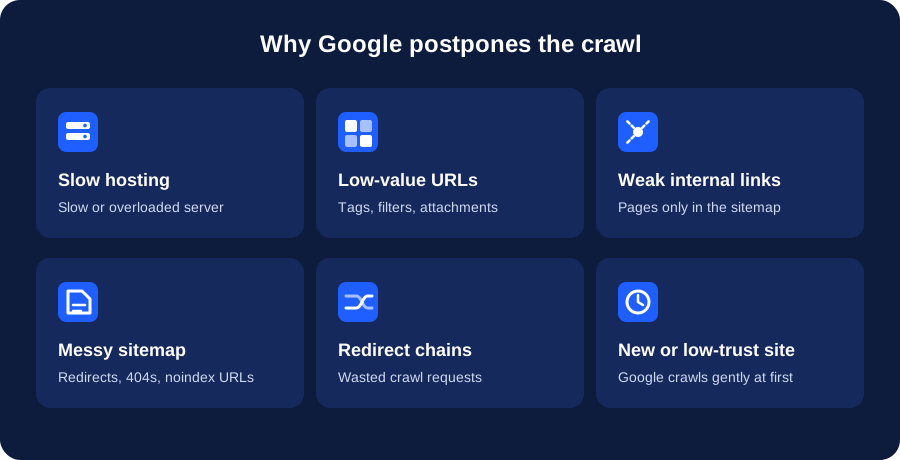
Cheap shared hosting, slow responses and failed requests make Google crawl less.
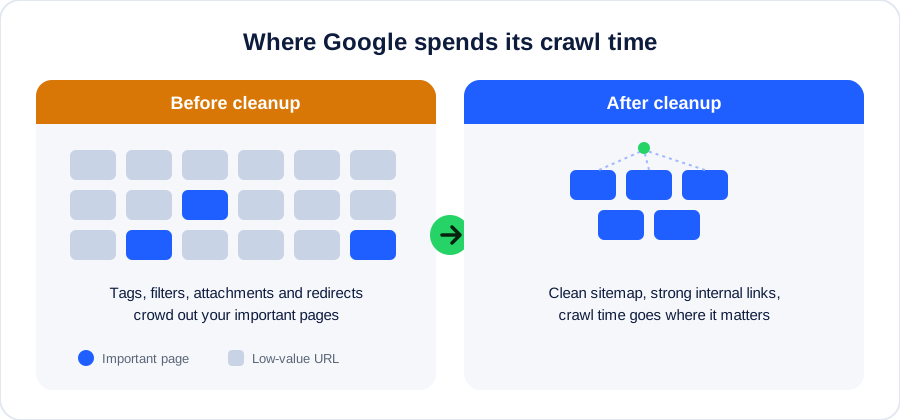
Tags, categories, attachments, search results and filters waste crawl attention.
A page found only in the sitemap can look less important than a page linked from strong sections.
Noindex URLs, redirects, 404s and thin URLs reduce trust in the sitemap.
Long redirect paths and empty pages consume crawl requests without producing useful pages.
Publishing hundreds of thin or templated pages at once pushes much of the site into the queue.
New domains are crawled gently until they establish a record of useful content.
Slow page rendering, admin requests and plugin bloat make each crawl more expensive.
Security plugins or CDNs may throttle Googlebot without showing an obvious warning.
Our method
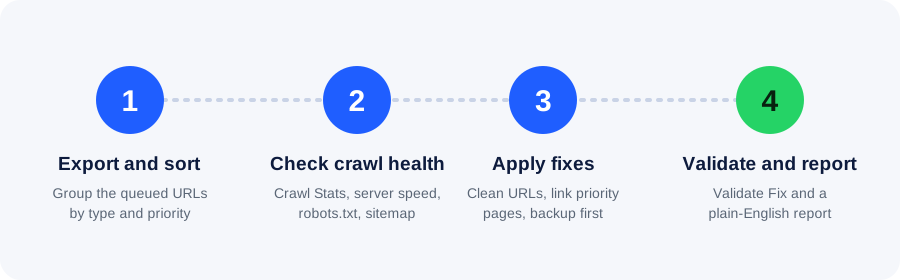
We group queued URLs into money pages, posts, archives, parameters and media.
We review Crawl Stats, server response, robots.txt, redirects and sitemap behaviour.
We clean low-value URLs, strengthen internal links and change settings with a backup first.
We request indexing for priorities, submit Validate Fix and send a clear report.
Crawled vs discovered
| Question | Discovered – not indexed | Crawled – not indexed |
|---|---|---|
| Did Google visit? | No, it is still in the queue | Yes, it read the page |
| Typical cause | Crawl, server or site trust | Content quality or duplication |
| Typical fix | Server, sitemap, links and URL cleanup | Content, canonicals and merging |
| Related service | This service | Crawled – Currently Not Indexed Fix |
What every package includes
Who this is for
One-time packages
No contract and no monthly lock-in. Send us your Search Console screenshot and we’ll tell you which option fits.
$20
For a few important pages
$50
For most WordPress sites
$100
For large or repeat problems
More than 100 URLs? Message us for a custom quote.
We fix the causes. Google makes the final crawling and indexing decision, so no honest provider can promise a guaranteed result or date.
What to expect
Technical fixes can show results within days, but Google decides how often it crawls your site. Established sites may see queued pages crawled within days or weeks. New or low-authority domains usually wait longer.
Validate Fix asks Google to recheck the URLs. We re-diagnose server speed, weak links or crawl waste instead of repeatedly submitting validation.
Reduce crawl waste
Frequently asked questions
Google knows the URL exists but has not crawled it yet. The page is in the queue, and Google has postponed the visit.
With “Discovered”, Google has not visited the page. With “Crawled”, Google has read the page and chose not to index it. The first is usually a crawl or site problem, the second a content quality problem.
A few low-value URLs here are normal. It becomes a problem when important pages stay in the list for weeks or the number keeps growing.
For most small sites, crawl budget in the strict sense is not the main issue. Server speed, URL clutter, weak internal links and low site trust usually matter more, and those are what we fix.
Sometimes it helps for a few priority URLs, but it does not solve the cause. If the server is slow or the page is not linked well, the URL can return to the queue. Fix the cause first, then request indexing.
Yes. Slow response times and server errors make Google crawl your site less. We check what Search Console reports and tell you if your hosting is part of the problem.
We take a full backup before changing anything, make only the changes agreed in the package, and list every change in your report. If you prefer, we can give you exact instructions for you to apply.
No. Google controls crawling and indexing. We guarantee a proper diagnosis, correct fixes and clear recommendations.
Free quick check
Send your website URL and a screenshot of the Page Indexing report. We’ll tell you what is holding Google back and whether the pages are worth fixing.
Chat on WhatsApp now