"How much does a web app cost?" has the same honest answer as "how much does a house cost?": it depends on what you build, where, and to what standard. That answer is frustrating when you need a budget, so this guide breaks the cost into parts you can actually estimate.
It is written for founders, operations leads and managers planning a client portal, internal tool, marketplace or SaaS product. By the end you should be able to read a quote, spot what is missing, and decide what to build first.
What Drives the Cost
Almost every web app estimate comes down to six factors.
1. Number and complexity of features. A login, a dashboard and a form are simple. Real-time collaboration, complex permissions, scheduling engines, pricing rules and reporting are not. Count the screens and, more importantly, the business rules behind them.
2. User roles and permissions. One type of user is simple. Customers, staff, managers and administrators with different access to different data adds design, build and testing time at every step.
3. Integrations. Payments, accounting, CRM, ERP, email, maps, shipping and AI services each need to be built, tested and monitored. A well-documented modern API is quick. A legacy system with no API can be the most expensive part of the project.
4. Data and migration. Importing years of records from spreadsheets or an old system takes cleaning, mapping and repeated test runs.
5. Security and compliance. Handling payments, health data or personal data under GDPR or UK GDPR adds requirements for access control, audit logs, encryption, backups and testing.
6. Design and quality standard. A simple internal tool can use a component library. A customer-facing product competing on experience needs research, custom design, accessibility work and more testing.
Typical Timelines by Project Type
Cost tracks time closely, because most of the cost is skilled people's time. These are typical ranges for a small, experienced team, assuming decisions are made quickly:
| Project type | Typical scope | Typical timeline |
|---|---|---|
| Internal tool or simple portal | 1 to 2 roles, forms, dashboards, one or two integrations | 6 to 10 weeks |
| MVP for a SaaS product | Sign-up, billing, core workflow, admin, basic analytics | 10 to 16 weeks |
| B2B client portal | Multiple roles, documents, orders or tickets, CRM or ERP sync | 12 to 20 weeks |
| Marketplace or multi-tenant SaaS | Two-sided users, payments, complex permissions, reporting | 5 to 9 months |
| Replacement for a core business system | Data migration, many workflows, several integrations | 6 to 12 months, phased |
Treat these as planning ranges, not quotes. The fastest way to reduce both time and cost is to reduce scope for the first release.
Where the Budget Goes
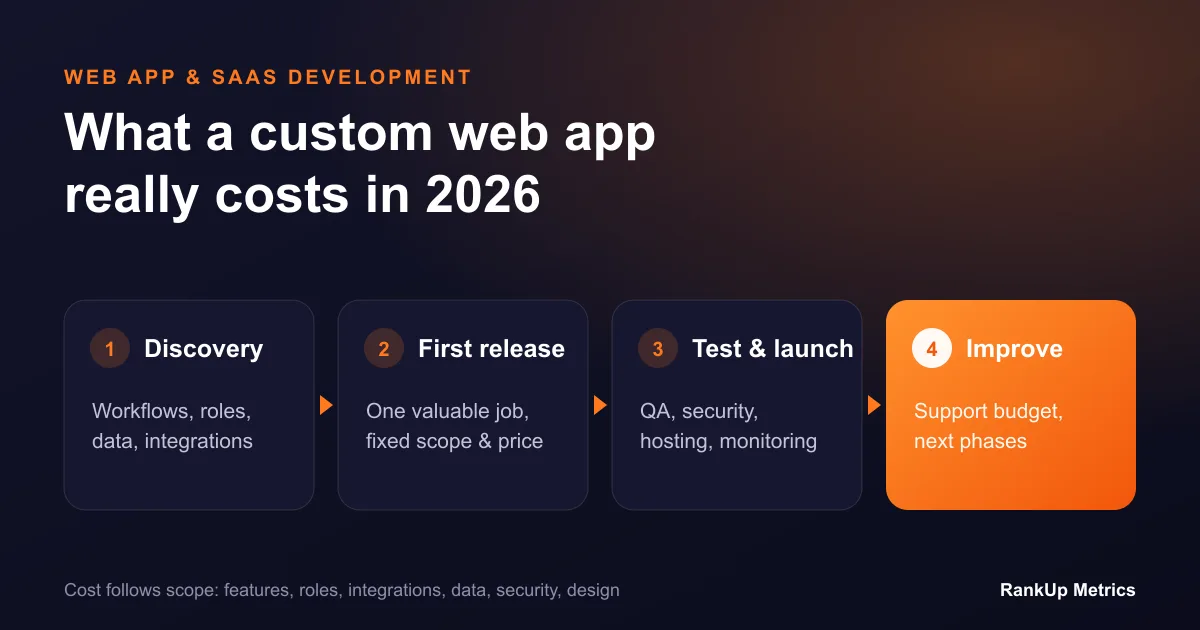
A healthy project spends money across the whole life of the product, not just on coding:
- Discovery and design: workflows, requirements, data model, prototypes. Usually 10 to 15 percent.
- Build: front end, back end, integrations. Usually the largest share.
- Testing and quality assurance: automated tests, manual testing, security checks.
- Deployment and infrastructure: hosting, monitoring, backups, environments.
- Support and improvement after launch: fixes, updates, new features. Plan an annual budget for this from day one.
A quote that is almost all "build" and nothing else is a warning sign. Testing, deployment and support still happen; they are just not priced.
Hidden Costs to Ask About
- Hosting and third-party services: cloud hosting, email sending, maps, AI APIs and monitoring tools are monthly costs.
- App store or payment fees if you add mobile apps or take payments.
- Ownership: does the price include the source code, design files and documentation?
- Change requests: how are new ideas during the build priced and approved?
- Your team's time: someone on your side must answer questions, review work and test. Budget their time too.
How to Keep Cost Under Control
Start with the workflow that creates the most value. Write down the one job the app must do well, such as "clients can place and track orders without emailing us", and build that first.
Phase the rest. Split the roadmap into releases. Each release should be usable on its own, so you get value and feedback before spending more.
Use proven components. Authentication, payments, admin panels and UI libraries do not need to be invented. Custom work should go into what makes your product different.
Decide quickly. Delays in feedback and decisions are one of the most common causes of overruns.
Prefer fixed scope per phase. A fixed price for a clearly defined phase, followed by the next phase, gives you control without pretending the whole product can be specified up front.
Custom Web App vs No-Code
No-code and low-code tools are excellent for prototypes and simple internal tools. Consider custom development when you hit their limits: per-user pricing that grows quickly, performance problems with larger data, complex permissions, integrations the platform cannot handle, or the need to own your product and data. Many teams prototype in no-code, prove demand, and then rebuild the proven workflow properly.
How to Get an Accurate Quote
Prepare a short brief before speaking to developers:
- The problem and who has it.
- The main user roles and what each needs to do.
- The systems it must connect to.
- Any data that must be migrated.
- Security or compliance requirements.
- What the first release must include, and what can wait.
- Your target launch date and budget range.
A good development partner will push back on scope, suggest a smaller first release, and explain the trade-offs. Be cautious with anyone who gives a confident fixed price for a large product after one short call.
Next Steps
If you want a realistic estimate for your idea, our web app and SaaS development team runs a short discovery phase that ends with a scoped first release, a timeline and a fixed price for that phase. If the app is meant to replace spreadsheets and disconnected tools, compare it with a custom ERP vs off-the-shelf ERP decision first, and if you are building a SaaS product, plan its B2B SEO content architecture alongside the build.