Ask your account managers how many emails a week ask "where is my order?", "can you resend the invoice?" or "what did we pay last time?". In many B2B companies the answer is hundreds. A client portal turns those requests into self-service, gives customers a better experience and frees your team for work that needs a person.
This guide covers custom B2B client portal development: the features clients actually use, how a portal connects to your CRM and ERP, the security you need, how to phase the build, and how to measure the return.
Start With the Requests Your Team Handles Today
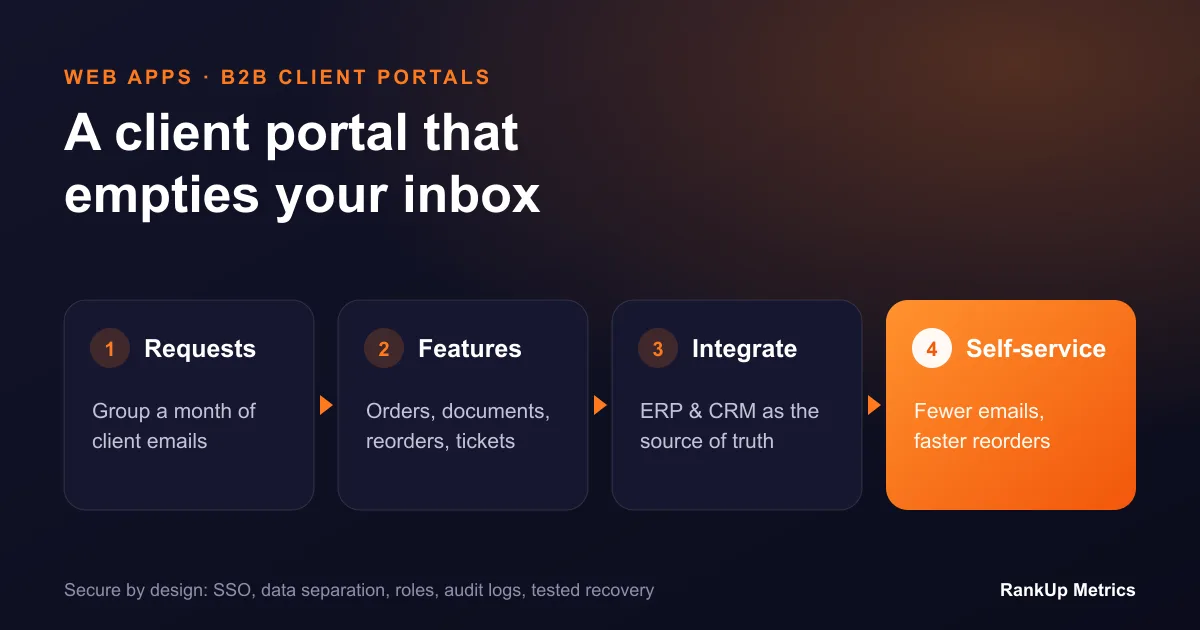
The best portal features come from your inbox, not a feature list. Before designing anything:
- Export a month of customer emails and support tickets.
- Group them by request type: order status, documents, pricing, reorders, account changes, technical questions.
- Count each group and estimate the time spent per request.
The top three or four groups are your first release. They are where self-service saves the most time and where customers will notice the change.
Features B2B Clients Actually Use
Order tracking. Live order status, delivery dates and tracking links, pulled from your ERP and carriers.
Documents in one place. Invoices, statements, delivery notes, certificates, contracts and technical sheets, searchable and downloadable.
Reordering. Past orders as templates, customer-specific catalogues and prices, and quick reorder for repeat buyers.
Account and users. Customers manage their own users, delivery addresses and contact preferences, with roles such as buyer, approver and finance.
Requests and support. Raise a quote request, return, service visit or support ticket with the right details captured up front, and track progress.
Project or service visibility. For service businesses: milestones, reports, files and approvals, so clients do not need status meetings.
Avoid building features no one asked for. A portal with four reliable features is used. A portal with fifteen half-finished ones is not.
How the Portal Connects to Your Systems
The portal is a window into data you already hold. A typical architecture:
- ERP for orders, stock, pricing, invoices and deliveries.
- CRM for accounts, contacts, opportunities and support cases.
- Document storage for files, certificates and contracts.
- Identity provider for secure sign-in, with options such as single sign-on for larger clients.
- An integration layer that reads and writes data through APIs, caches what is safe to cache and keeps the portal fast even when back-office systems are slow.
Decide early which system is the source of truth for each type of data. The portal should not become another place where data is copied and goes out of date.
Security Essentials
B2B portals hold commercially sensitive data, so security is part of the design, not a final check:
- strong authentication with multi-factor options and single sign-on for enterprise clients;
- strict data separation so one customer can never see another's records;
- role-based permissions inside each customer account;
- audit logs of sign-ins, downloads and changes;
- encryption in transit and at rest, regular backups and tested recovery;
- penetration testing before launch and after major changes;
- data protection compliance such as GDPR or UK GDPR, including data retention rules.
Phased Delivery
Phase 1 (8 to 12 weeks): sign-in, account and users, order tracking and documents. Integrate read-only with the ERP.
Phase 2: reordering, customer-specific pricing and requests that write back to the ERP or CRM.
Phase 3: project visibility, approvals, notifications, analytics and any advanced features your clients ask for.
Launch Phase 1 with a small group of friendly customers, fix what they find, then roll out to everyone. Their feedback is more valuable than any specification.
Measuring ROI
Track a small set of numbers before and after launch:
- Support requests by type. The groups you targeted should fall.
- Time per order for your sales and operations team.
- Portal adoption: share of active customers using it monthly, and share of reorders placed through it.
- Days sales outstanding, if invoices and statements are easier to access.
- Customer satisfaction or retention for portal users compared with non-users.
A simple return estimate: requests removed per month × average handling time × staff cost, plus any extra orders from easier reordering. Compare that with the build and running cost to estimate payback.
Build or Buy?
Off-the-shelf portals built into CRMs or ERPs are fine when your needs are standard and your data lives in that one system. A custom portal makes sense when data comes from several systems, your pricing or workflows are specific, or the portal is part of how you win and keep customers. For cost and timeline ranges, see our custom web app development cost breakdown.
Next Steps
Our web app and SaaS development team designs and builds B2B portals connected to existing ERPs and CRMs, starting with a discovery phase based on your real customer requests. If your back-office systems are the limit, read custom ERP vs off-the-shelf ERP first.